Materials Tab
The Materials tab is located in the Library window and contains all the preset and saved materials in your library.
|
|
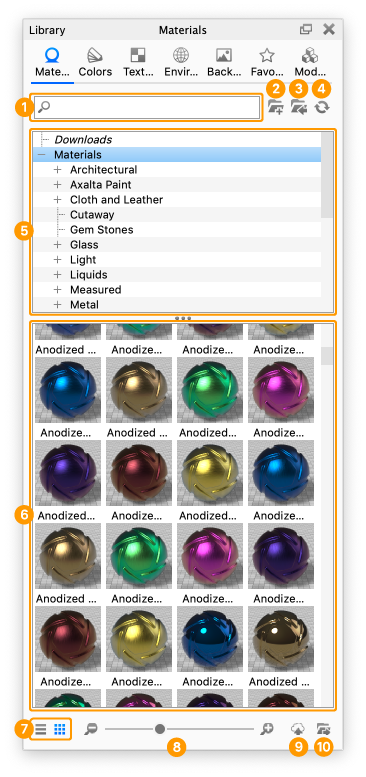
- Search
Type in any keyword to search for a material by name.
- Add Folder
Click this button to add custom material folders.
- Import
Import a material file. You may import the following formats directly into the library: MTL,, AxF, U3M, and KMP (KeyShot Studio’s native material format).
- Refresh
Refresh material list if any changes were made.
- Folder Tree
Contains the folder structure of the material folders.
- Material Thumbnails
Material ball swatches of materials within the selected folder.
- List/Thumbnail Toggle
Switch displaying the materials with thumbnails and in a list view.
- Zoom Slider
Slide to change the size of the thumbnails. You can also use +/- to change in steps.
- Upload to Cloud Library
Click this button to upload a custom material to the Cloud Library.
- Export
Export a saved material as a KMP file.
|
Learn more about the Material Library here.