Multi-Layer Optics

|
The Multi-Layer Optics material enables you to create materials with multiple thin-film layers.
|
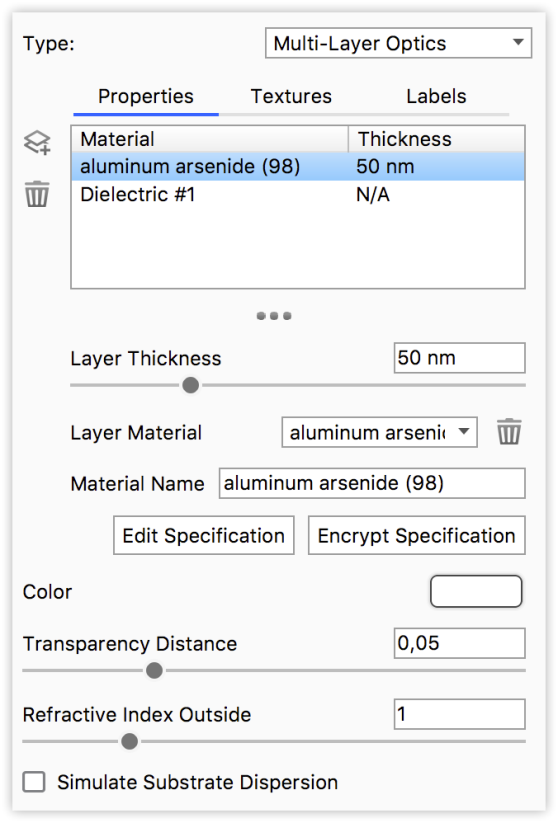
|
Layer ListLists all layers of the material. Note that the first layer is the “base” layer (substrate).
Layer PropertiesThese properties apply to the layer that is highlighted in the Layer list
|
 Add layer
 Delete layer
Edit Specification
Allows you to enter/edit the entire material, including all layers in plain text.
Encrypt Specification
If you want to protect the specifications of your material, you can encrypt it. This will hide information about the layers in the material and the material can no longer be edited.
When the material is encrypted you can Clear Specification. This will delete the specification of the the current material and let you start from scratch. Encrypted materials can not be un-encrypted!
Color
This option controls the overall color of this material type. When light enters the surface it will take on the color set here.
Transparency Distance
This slider controls the depth of the color selected in the Transmission setting, depending on the thickness of the part to which the material is applied. After setting a color in the Transmission setting, use Transparency Distance to make that color more or less saturated and prominent. A lower setting will show the color more in thin areas of the model, and a high setting will make the color faint in the thin areas.
This physically accurate parameter simulates the effect you can observe by looking at the color of the shallow water at a beach versus the deep blue of a deep ocean. Without this you would see through to the bottom of the deepest ocean as easily as to the bottom of a swimming pool.
Refractive Index Outside
This slider is an advanced but powerful setting that allows you to accurately simulate the interface between two different refracting materials.
Simulate Substrate Dispersion
Enabling this will simulate caustics in the substrate if it is a transparent material.
You can learn more about Caustics on the Refractive Index page.